

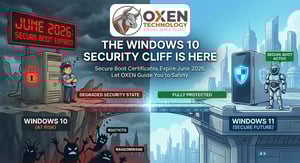
The "We Promise We Weren't Just Nagging You" Update:
Written by Ken Gulick OXEN Technology.
Here at OXEN Technology, we know we bug you about Windows 10 a lot.
Throughout 2025, our team was on a mission to help clients transition away from it. If you fielded those calls and emails, you might have wondered if we were just trying to drum up project work! We completely understand. But the simple truth is this: we’ve navigated enough of Microsoft’s end-of-life cycles to know that when a sunset date approaches, things can get bumpy fast.
A recent development just proved our point, and we want to keep you ahead of the curve.
The Silent Security Guard: Secure Boot Certificates Are Expiring
Microsoft recently announced that Secure Boot certificates—which have been quietly doing their job since 2011—are set to expire in June 2026.
Think of Secure Boot as the bouncer at the door of your computer. Before Windows even loads, it checks IDs to make sure nothing malicious has tampered with the boot process. It’s a VIP layer of protection, and most people don’t even know it’s there.
To handle the expiration, Microsoft is rolling out fresh certificates via regular Windows updates. If you’re on Windows 11 or a PC manufactured since 2024, you’re golden—they update automatically.
The catch? If you’re still cruising on Windows 10 without a paid Extended Security Updates (ESU) license, your machines won't receive these updates. Microsoft has been crystal clear: unsupported versions of Windows are off the guest list.
What Happens Without the Update?
Don't panic—your computers won’t suddenly turn into paperweights. However, Microsoft warns that devices without renewed certificates will enter a "degraded security state."
What does that actually mean for your business? Weaker boot-level protections leave the door cracked open for sneaky threats that load before your antivirus even wakes up. We’re talking about deep-rooted ransomware or rootkits that can survive a full drive wipe. For businesses handling sensitive customer data or strict compliance rules (especially in healthcare and finance), operating in this state isn't just a headache; it’s a real-world liability.
Your Two Game Plans
You have two solid paths forward:
- Upgrade to Windows 11 (The OXEN Recommended Route): This gets your devices onto a fully supported operating system that handles Secure Boot updates automatically. It’s the long-term, headache-free fix we’ve been cheering for!
- Purchase Microsoft’s Extended Security Updates (ESU): If upgrading right this second isn't feasible, ESU is your safety net. It keeps your Windows 10 machines receiving critical updates. But remember, it’s a bridge, not a destination. It gets pricey fast, and Microsoft can change the terms at any point:
| ESU Timeline | Cost per Device |
| Year 1 | $61 |
| Year 2 | $122 |
| Year 3 | $244 |
Those costs add up quickly across a whole team, and eventually, the ESU spend easily exceeds the cost of simply upgrading your machines.
Why OXEN is Sharing This
We promise this isn't a "we told you so" moment! We're writing this because keeping your business safe is what we do. You shouldn't have to spend your days tracking Secure Boot expirations or reading dry Microsoft servicing announcements, that’s what the OXEN Technology team is here for.
June 2026 will be here before we know it. Planning an upgrade or getting ESU licensing in place takes time, especially when coordinating across dozens of workstations. If you still have Windows 10 machines in your environment, let's get a plan in motion.
(If you want to geek out on the technical details, TechRadar published an excellent overview that’s worth reading!)
Frequently Asked Questions
Will my Windows 10 computer stop working in June 2026?
No. It’ll keep working, but with weaker boot-level security, which means it gets more vulnerable over time.
Is the ESU license expensive?
It depends on your volume and licensing setup. We can help you figure out whether ESU or a full upgrade makes more sense for your situation.
How do I know if my PCs already have the updated certificates?
If you’re on Windows 11 with regular updates, you’re probably covered. Windows 10 on ESU should get them automatically too. We can run a quick check to confirm either way.
Not sure where your business stands? We’ll run a free assessment of your Windows 10 exposure and walk you through your options. Reach out to schedule a 15-minute call, and we’ll make sure you’re covered before June.
Want to Dig Deeper? Official Microsoft Resources
Refreshing the Root of Trust: Industry Collaboration on Secure Boot Certificate Updates (Windows Experience Blog, Feb 10, 2026)
Act Now: Secure Boot Certificates Expire in June 2026 (Windows IT Pro Blog)
Secure Boot Playbook for Certificates Expiring in 2026 (Windows IT Pro Blog)
Windows Secure Boot Certificate Expiration and CA Updates (Microsoft Support)
Secure Boot Certificate Updates: Guidance for IT Professionals (Microsoft Support)