


How to freeze a row or column in Excel

By July 6, 2021May 27th, 2025Tech Tip
OXEN Tech Tip

If you’re working on a large spreadsheet or a long list in Excel, you may want to freeze the top row or the left column. This way if you scroll down or towards the right, your labels or other information are always visible. So how do you do this?

Freeze Top Row

  1. Go to View on the Ribbon toolbar.
  2. In the Window group, click Freeze Panes > Freeze Top Row.
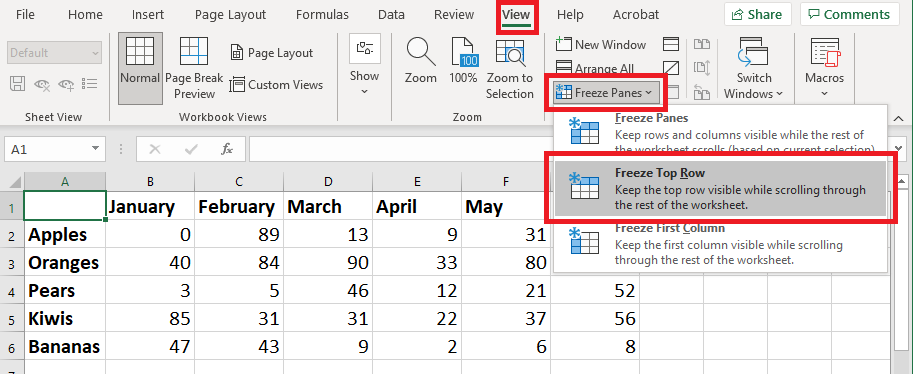
Freeze Top Row in Excel

You’ll see a solid gray line appear below the frozen row. If you scroll down, the top row will stay visible.

Freeze Top Row in Excel

Freeze First Column

  1. Go to View on the Ribbon toolbar.
  2. In the Window group, click Freeze Panes > Freeze First Column.
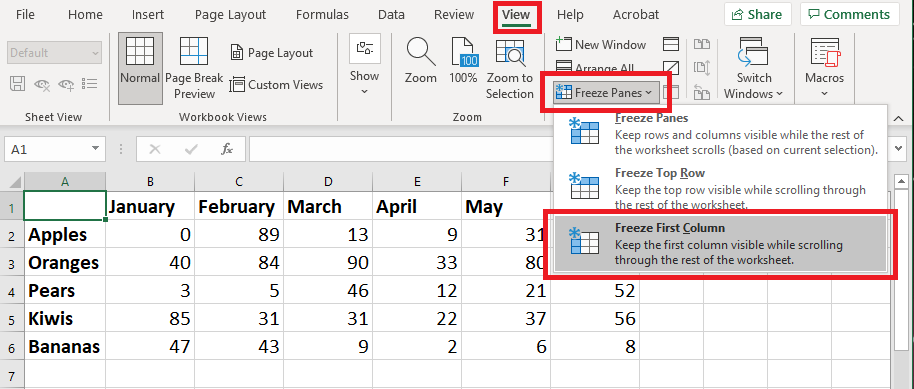
Freeze First Column in Excel

You’ll see a solid gray line appear next to the frozen column. If you scroll right, the left column will stay visible. For example, in the screenshot below, you can see Column A is frozen, and when scrolling right it’s displaying right next to Column E.

Freeze First Column in Excel

How to Unfreeze Panes

To unfreeze all rows or columns, click Freeze Panes > Unfreeze Panes.


Industries in Kansas City

Industries in Kansas City: Scaling Grain Silos With Spreadsheet Systems

| Managed Services | No Comments
Across Kansas City industries, growth exposes fragile systems and hidden operational risk faster than leaders expect 🧠📊

2025 A Year in Review

| Announcements | No Comments
As we reflect on the past year, I want to begin by expressing my heartfelt gratitude to our clients for their continued trust and partnership with OXEN Technology. Your confidence in our team has been the driving force behind our growth and innovation, and we are deeply appreciative of the opportunity to serve and support your organizations. 2025 was an eventful year for OXEN Technology. In my first article as President, I shared my vision for the company and now, looking back, I am pleased with our progress. Early on, I described OXEN as my dream career, a statement that…

Why Your Business Needs a Managed Security Service Provider (MSSP)

| Business Productivity, Cybersecurity | No Comments
In today’s digital landscape, the phrase "it won't happen to me" is no longer a strategy; it’s a liability. Cyber threats are evolving faster than most internal IT teams can keep up with. Hackers aren't just targeting Fortune 500 companies anymore - they are targeting "Main Street" businesses, local organizations, and small to medium businesses that often hold valuable data but lack the massive defense budgets of global corporations. If you are feeling overwhelmed by the alphabet soup of cybersecurity (EDR, SIEM, SOC, MFA), you are not alone. This is exactly where a Managed Security Service Provider (MSSP) comes in.…
Share